You paid for fast internet. Your provider promised decent speeds. But here you are, watching videos buffer and waiting for pages to load. Maybe the problem is not your ISP. It could be sitting right there at the end of your Ethernet cable.
RJ45 connectors are small plastic clips that connect your network cables to routers, computers, and switches. They look simple enough. But pick the wrong type or install them poorly, and your entire network suffers. Slow speeds, dropped connections, and frustrating downtime become part of your daily routine.
Most people don’t think about these RJ45 connectors until something goes wrong. That’s a mistake.
What Exactly Is an RJ45 Connector?
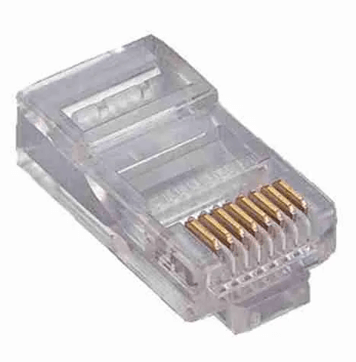
RJ45 stands for Registered Jack 45. It’s the standard connector used for Ethernet networking. You’ve probably seen them before. They’re the clear or colored plastic plugs at the end of network cables.
Inside each connector are eight metal pins. These pins make contact with the wires inside your Ethernet cable. When everything lines up correctly, data flows smoothly. When it doesn’t, you get problems.
The connector itself seems basic. But the quality of materials, the precision of the pin alignment, and the way you crimp it onto the cable all matter. A lot.
Why RJ45 Connectors Matter in Kenya
Power fluctuations are common across many parts of Kenya. Your network equipment deals with voltage spikes and drops regularly. Cheap connectors can corrode faster under these conditions. The metal pins lose their grip. Connections become unstable.
Then there’s dust. Nairobi alone has plenty of it. Poorly made connectors let dust settle on the pins. Over time, this creates resistance and signal loss.
If you’re running a small business, every minute of downtime costs money. Students preparing for exams can’t afford unreliable internet. Remote workers need stable connections for video calls.
The right RJ45 connector prevents most of these headaches. The wrong one guarantees them.
The Wiring Standards You Need to Know
RJ45 connectors follow two wiring standards: T568A and T568B. Both work. But you need to be consistent.
T568B is more common in Kenya and most parts of the world. If you’re making straight-through cables (the normal kind), use T568B on both ends of the cable. This keeps the wire pairs aligned correctly.
T568A exists mostly for specific installations and crossover cables. Unless you have a specific reason to use it, stick with T568B.
Mixing the two standards on the same cable creates a crossover cable. Those have their uses, but if you’re just trying to connect your computer to a router, you want a straight-through cable. Both ends should follow the same standard.
Color codes matter here. Each wire goes into a specific slot in the connector. Get the order wrong, and nothing works.
Common Mistakes People Make
Rushing the crimp is probably the biggest error. If you don’t push the wires all the way into the connector before crimping, some pins won’t make contact. Your cable might work at first, then fail randomly.
Using the wrong crimping tool also causes problems. Cheap tools don’t apply even pressure. The result is loose connections that fail over time.
Another mistake is buying the cheapest connectors available. Yes, they look identical to quality ones. But the metal inside corrodes faster. The plastic cracks more easily. You save a few shillings upfront and lose hours troubleshooting later.
Finally, people forget to test their cables after installation. A simple cable tester costs very little. It tells you immediately if you’ve wired something wrong. Skipping this step means you might install dozens of cables before realizing half of them don’t work properly.
See also: Business Intelligence Technology
How to Choose the Right RJ45 Connector
Match the connector to your cable type. Cat5e cable gets Cat5e connectors. Cat6 cable gets Cat6 connectors.
Buy connectors with gold-plated pins if possible. Gold resists corrosion better than other metals. The connection stays reliable longer.
Get pass-through connectors if you’re new to cable termination. These let you push the wires all the way through, making it easier to check your wire order before crimping. Regular connectors require more skill to get right.
Buy from reputable suppliers. Counterfeit networking products are common. They look genuine but fail quickly. A trusted shop might charge a bit more, but the quality difference is real.
Quick Installation Tips
Strip about 2 cm of the outer cable jacket. Don’t cut too deep or you’ll damage the inner wires.
Untwist the wire pairs just enough to arrange them in the correct order. Keeping the twists close to the connector reduces interference.
Trim the wires so they’re all the same length before inserting them into the connector. Uneven wires cause incomplete connections.
After crimping, give the cable a gentle tug. The connector should hold firm. If it slides off easily, you didn’t crimp it properly.
Your Network Deserves Better
Most internet problems have simple fixes. RJ45 connectors are one of them.
You don’t need to be a networking expert. You just need the right parts and a bit of care during installation.
Get quality connectors. Follow the wiring standard. Test your work. Your network will thank you with faster speeds and fewer headaches.